The Complete Guide to On-Premise LLM Deployment for Regulated Enterprises
Pillar reference for regulated enterprises evaluating on-prem LLM: decision framework, three privacy layers, 10-component reference architecture, complete TCO (including recurring costs most RFPs miss), 7 operational surfaces, 15 vendor questions, 3 deployment patterns, 90-day playbook.
The Complete Guide to On-Premise LLM Deployment for Regulated Enterprises
For CIOs, VP Engineering, and infrastructure leaders evaluating on-premise AI platforms. Written to be handed to your technical team as a single link. Updated: April 2026.
What this guide is. A reference for enterprises whose compliance requirements, data-sensitivity posture, or strategic architecture makes on-premise LLM deployment the right answer — and for enterprises who have been told that but want to check the math before signing. We cover the reference architecture, the TCO model that most RFPs under-specify, the seven operational surfaces your platform team will own, the vendor-evaluation questions that separate built-for-this vendors from retrofitted ones, and the decision framework for when on-prem is the right bar vs hybrid-with-boundary.
What this guide is not. A product pitch. Every section is product-agnostic; wherever we reference Alli Coworker specifically, we say so. If after reading you decide a different vendor or a different architecture is right for your situation, we'll consider that a successful use of your reading time.
Contents
- When on-prem is the right answer (decision framework)
- The three layers of "private" and what your compliance bar actually requires
- Reference architecture: the components of a production on-prem LLM platform
- The TCO model most RFPs under-specify
- The seven operational surfaces your team will own
- Vendor evaluation: 15 questions that matter
- Deployment patterns: air-gap, BYOC, hybrid-with-boundary
- The first 90 days in production
- Reading list and further references
(Sections 1-9 will be drafted over subsequent cycles. Each section maps to one supporting post in the pillar cluster; readers who want depth on a specific section can click through to the supporting post, and supporting posts link back here as the hub.)
1. When on-prem is the right answer (decision framework)
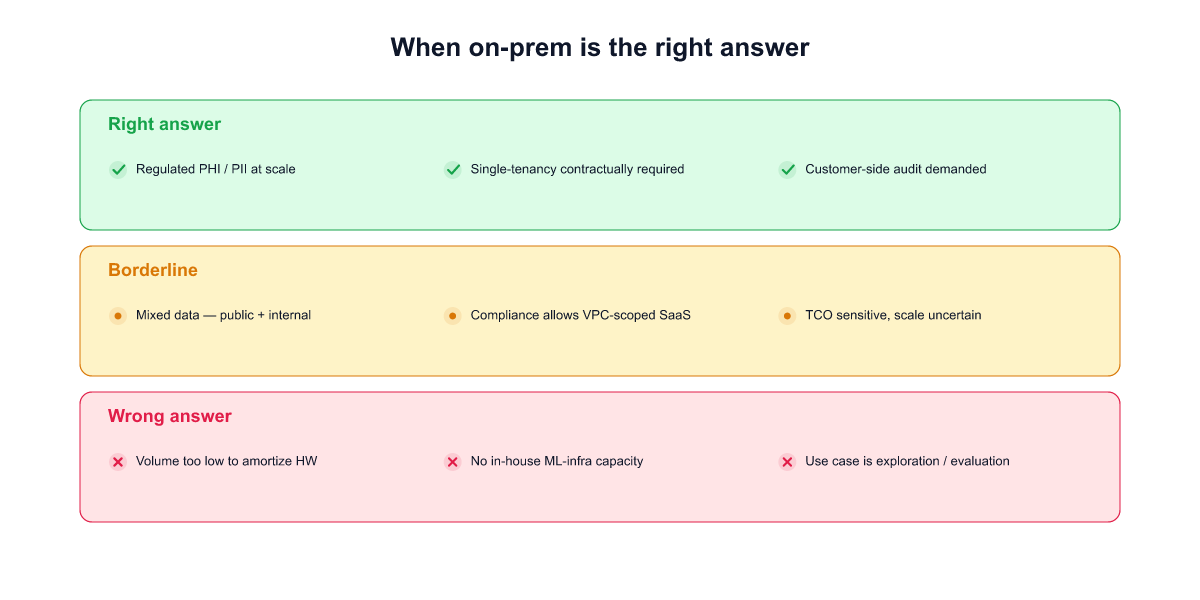
On-prem LLM deployment is the right answer for a specific set of enterprises, and the wrong answer for a larger set that assume they need it. Before reading the rest of this guide, it's worth being honest about whether you're in the first group.
On-prem is the right answer when
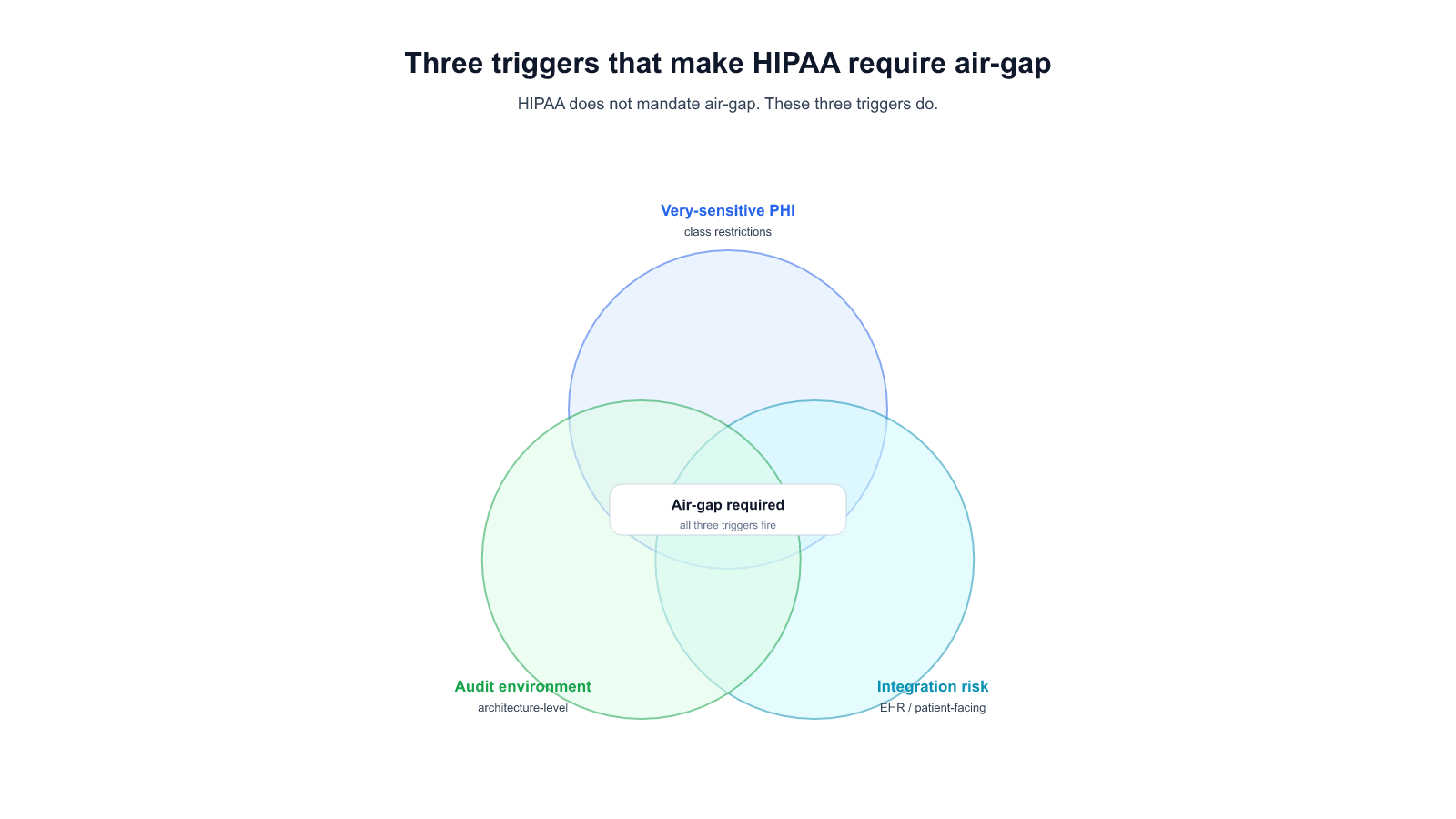
1. The regulation is explicit about zero egress for this specific workload. Classified government data, some healthcare PHI under strict interpretation, certain banking data in jurisdictions that forbid even encrypted egress (parts of KR, some EU sector rules, China personal-information-protection law for specific categories), defense contractor environments with ITAR or equivalent. These are well-defined legal situations where the analysis ends at the regulation — SaaS is disqualified regardless of encryption posture, and the TCO premium of on-prem is a cost of entry to the market, not a choice.
2. Your compliance framework audits architecture, not outcome. Some regulators evaluate how data is handled, not whether a specific risk materialized. Auditors who ask "show me the physical boundary of this data" rather than "show me the encryption logs and access-controls" are architecture-auditors. If your relevant audit body is in this camp — CSAP in Korean public sector, some AISI Japan guidance for the financial sector, some EU banking supervisors — SaaS with the strongest BAA and TLS posture still does not pass. On-prem is required regardless of the vendor's SOC 2 / ISO 27001 / penetration test records.
3. You have a platform team that can absorb the recurring cost without degrading other commitments. On-prem is not a one-time project. It's a recurring cost of model refreshes, runtime upgrades, hardware migrations, and eval-loop maintenance, as spelled out in later sections. If your organization has a genuine infrastructure team who can own the lifecycle — and doing so doesn't starve their other work — on-prem is sustainable. If the lifecycle work would compete with every other initiative, on-prem is likely a strategic mistake even when the compliance case points to it. (See [[023]] for the cost-structure data from 19 customer deployments over 180 days.)
On-prem is usually not the right answer when
1. Your compliance framework permits encrypted-egress-with-boundary. GDPR with SCCs, HIPAA-covered cloud BAAs, PCI DSS in cloud environments with defined scope, Korean PIPA with proper cross-border-transfer mechanism. If your specific regulation permits it, the on-prem choice is a preference and it costs more than the preference is worth. The mistake here isn't over-engineering; it's diverting a 7-figure annual operating cost from other initiatives that need the investment.
2. Your platform team is already the bottleneck for every software initiative. On-prem moves vendor work onto your infrastructure team. If that team is the constraint on your company's ability to ship anything new, adding a recurring LLM-platform workload is a strategic mistake. You will ship fewer things, not safer things. A hybrid architecture with audited boundaries typically costs less operator capacity for the same compliance outcome.
3. Your use case benefits from frontier capability. Agentic workloads, long-context reasoning, multilingual understanding, new tool-use patterns, retrieval over very large corpora — these capabilities are shipping in new model versions faster than most air-gap deployments can track. A two-to-four-quarter lag between your on-prem fleet and the public frontier is common. For consumer-facing, sales-facing, or talent-retention use cases, that lag may erode the product's value faster than the TCO gain from self-hosting.
The borderline category — the majority of regulated enterprises
There's a category that doesn't fit cleanly in either list: enterprises who have been told (or assume) they need on-prem because their peers do, but whose actual compliance requirement is satisfied by hybrid deployment with encrypted egress and auditable boundaries. We think this is a large group — possibly the majority of regulated enterprises currently evaluating on-prem AI.
The right test is not "do other firms in my sector run on-prem." It's "show me the regulation that specifically requires zero egress for this workload." If that regulation exists, proceed to on-prem and pay the model-refresh tax knowingly. If it does not, hybrid is almost always cheaper over a three-year horizon — and the rest of this guide should shift from "how to deploy on-prem" reading to "how to audit a hybrid architecture" reading, which is a different conversation with a different set of vendors.
If after this section you conclude on-prem is the right answer, keep reading. The next eight sections cover the architecture, cost model, operational surfaces, vendor evaluation, deployment patterns, and first-90-day playbook.
2. The three layers of "private" and what your compliance bar actually requires
"Private AI assistant" is on every procurement RFP, and the word does too much work. In 19 enterprise on-prem deployments we've watched from RFP to production, more than half had a first-meeting conversation where buyer and vendor realized they meant different things by private. The fix is to separate the word into three layers at spec-time, not at integration-time.
The three layers are strictly nested: if you need Layer 3, you need 2 and 1; if you need Layer 2, you need 1.
Layer 1 — Private data ingress. The documents, messages, and queries sent to the AI never leave the customer's network boundary in cleartext. Satisfiable by encrypted SaaS with BAA and customer-managed keys, by single-tenant BYOC hosted in the customer's cloud account, or by fully on-prem. The common failure is a silent TLS-terminating proxy on the vendor side that wasn't priced into the encryption story.
Layer 2 — Private model operation. The model runs on hardware the customer controls, and the operational metadata — query volume, latency tails, feature-usage timing, per-user request patterns — stays with the customer. This matters when patterns themselves are sensitive: an M&A team's query volume spiking on deal-announcement Tuesday is MNPI-adjacent signal, and a SaaS vendor's operational dashboard sees it even with query content encrypted. SaaS fails this layer structurally. BYOC can approach it with careful control-plane configuration. On-prem is complete by architecture.
Layer 3 — Private retrieval and memory. The corpus the AI grounds on stays inside the customer's boundary — embeddings, vector store, retrieval logs, and any retraining-inclusion decision. This is the layer that breaks most SaaS AI products for strictly regulated corpora, because the retrieval layer sits exactly where the sensitive data lives, and the easy path for a vendor is to host the vector DB. Three sub-layers each need independent architectural decisions: where embeddings happen, where vectors are stored, and whether retrieval logs feed the vendor's next model.
Which layer does your compliance bar actually require?
- Layer 1 only is enough for most HIPAA-covered administrative tooling, for most GDPR deployments where the data-transfer mechanism is documented, and for auditors who evaluate outcome rather than architecture.
- Layer 2 becomes required when operational patterns are themselves sensitive (MNPI-handling financial teams, active-investigation workflows, R&D timing) or when your regulator explicitly scopes operator visibility (FINRA, NIST AI RMF MEASURE/MANAGE, some AISI Japan draft guidance).
- Layer 3 becomes required when the retrievable corpus contains PHI, PCI-scoped data, GDPR Article 9 special categories, or trade-secret-grade material (legal work product, clinical trial docs, M&A deal rooms), or when your auditor asks for the physical boundary of the data itself.
The three-layer framing is the same framing used in our companion post [[032 — Private AI Assistant: What "Private" Actually Means When You're Regulated]], which walks through each layer's failure modes, architectures, and regulatory anchors in detail. If your procurement team is writing the RFP right now, that post is the version to hand them.
On-prem is the only architecture that satisfies all three layers by default. Hybrid and BYOC can satisfy all three, but require explicit customer-side engineering that rarely ships in a vendor's default topology — ask for the deployment diagram, not the product-tier name.
3. Reference architecture: the components of a production on-prem LLM platform
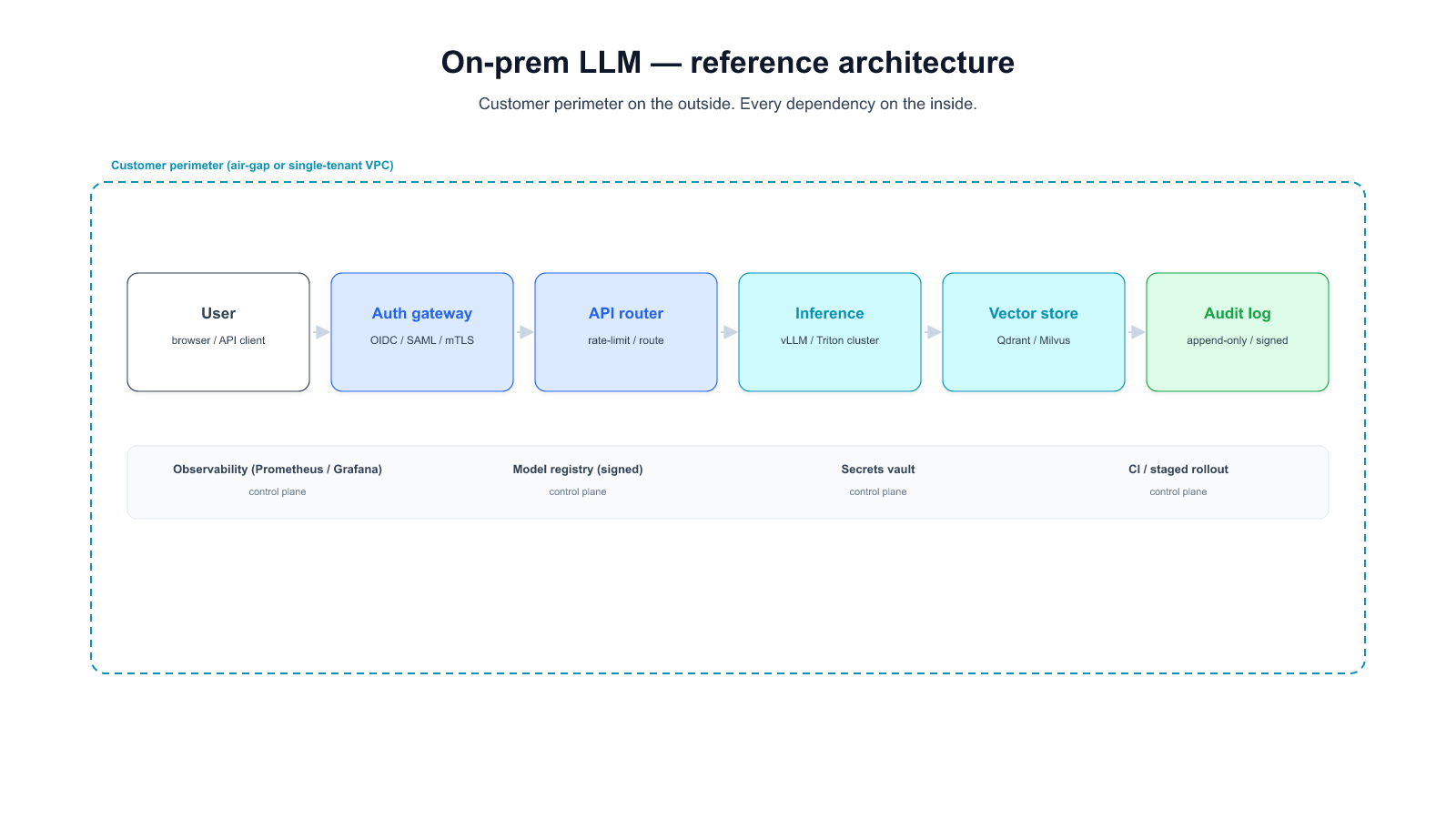
A production on-prem LLM platform is ten distinct components that most RFPs treat as one line item. Naming them separately is the first step in sizing the work, pricing the vendor, and knowing which parts your team owns.
Grouped into four conceptual layers:
Infrastructure foundation (layers 1-3)
-
Hardware tier. GPU cluster, high-bandwidth networking (InfiniBand or RoCE for multi-node inference), local storage sized for model weights and vector databases (typically 5-10 TB per cluster at today's model sizes), and backup power/cooling that matches your data center's availability tier. Sizing question: how many concurrent users at what latency target, and what's the headroom for the next model generation?
-
Model registry. OCI-compatible artifact store that holds base models, fine-tuned variants, and quantizations. Integrity verification (SHA-256 of weights at upload and at pod start), signed artifacts, version pinning by commit SHA. A customer's first surprise is that a 70B model is a 140 GB artifact — the registry needs capacity and throughput that typical CI artifact stores lack (see [[023]] Incident 3).
-
Data plane + ingestion. Document parsers (PDF, DOCX, HTML, proprietary formats), chunking pipeline, metadata extraction, content-type classifier, and the ETL plumbing between your existing document repositories and the retrieval stack. The parser is where deployments most often break on upgrade — a minor version bump can add content types that break downstream schemas silently (see [[023]] Incident 2).
Inference and retrieval (layers 4-6)
-
Serving runtime. vLLM, TGI, Triton, or SGLang. Runtime choice matters less than operational hooks (see [[034 — Self-Hosted LLM Operator's Checklist]] for the engineering depth).
-
Inference gateway. The HTTP surface that fronts the serving runtime. Applies authentication, per-user quotas, prompt-length admission controls, tool-call allowlists, audit logging. OpenAI-compatible API shape by default so downstream clients don't lock to a specific vendor runtime.
-
Retrieval stack. Embedding service (running inside your boundary, not via a vendor API — see [[032]] §Layer 3), vector database (FAISS, Milvus, Qdrant, or pgvector depending on scale), reranker (optional but often high-ROI), and the chunk-retrieval API. Vector DB sizing is usually underestimated at RFP — at ~1 KB per chunk × 10 million chunks × 2-3 embeddings (multi-representation retrieval), you're in the 20-30 GB range before memory headroom.
Governance and quality (layers 7-8)
-
Identity layer. Corporate SSO (OIDC / SAML) into the inference gateway, per-user or per-team quota state, audit-log writer with retention matched to sector regulation. The "API key" approach does not survive a security audit — treat SSO as table stakes.
-
Evaluation infrastructure. Task-specific dataset (50-500 real queries, not HumanEval / MMLU), automated runner that fires on every weight / runtime / corpus change, quality dashboard that sits in the same monitoring rotation as serving metrics, failure-case review cadence. The eval loop is covered in depth in [[034]] Surface 6.
Lifecycle and operations (layers 9-10)
-
Upgrade infrastructure. CI/CD pipeline with per-release eval gates, percentage-routed canary deployment, automatic rollback on latency or quality regression, weight+runtime+CUDA version pinning in deployment manifests. Without this layer, every upgrade is a multi-week manual project and every regression is an incident (see [[023]] for the cost-structure data).
-
Observability stack. Token-level metrics (tokens/sec, TTFT, ITL tail), queue-level (depth, rejection rate), resource-level (GPU SM utilization, memory bandwidth, KV-cache occupancy), request-level sampled structured logs. Wired on day one, not week three.
A hero diagram tying these ten components into a single reference architecture is the anchor image for this page — it's the visual a CIO can share with their architecture review committee. (Diagram to be commissioned per 036-images-pillar-onprem.)
What a vendor owns vs what your team owns. The answer varies by deployment pattern (§7 covers the three main patterns). In pure on-prem: 1-10 all sit inside your boundary, vendor provides most as a packaged distribution, your platform team operates. In air-gap: same, plus the delivery mechanism for model refreshes becomes a recurring operational concern (media, signed packages, air-gap-safe update tooling). In hybrid: some components (typically 7, 8, 10) may sit in a managed control plane while the data plane (4-6) stays on-prem.
The rest of the guide walks through cost (§4), operations (§5), vendor evaluation (§6), and the three deployment patterns (§7) in that order.
4. The TCO model most RFPs under-specify
Most on-prem AI TCO models have two columns: upfront (hardware + software + setup) and recurring (support + hardware refresh on a 3-year cycle). This model produces a number the finance team can sign off on, and misses roughly a third of the actual recurring cost.
Here is what a complete TCO model contains. The first group is what typical RFPs include. The second group is what most RFPs leave out. The third group is the set of costs that only appear after launch.
Group 1 — Typically in the RFP:
- Hardware capital cost (GPU cluster, storage, networking). Largest single line at launch; amortizes over 3 years.
- Software license / subscription for the AI platform vendor.
- Professional services (initial deployment, integration with internal systems, handover).
- Hardware refresh reserve (plan for 3-year GPU generation turnover).
- Vendor support contract (typically 18-22% of license annually).
Group 2 — The recurring work most RFPs under-specify:
- Model refresh engineer-days. Every base-model upgrade cycle — frontier models are releasing on a rough quarterly cadence — costs a measurable number of senior-engineer days to qualify, tune for your hardware (see [[023]] Incident 1: B200 pre-tune regression), regression-test against your eval suite, and deploy through canary. From the 19 customer deployments we've tracked: roughly 2-5 engineer-days per model refresh. Over 12 months, 4 refreshes × ~3 engineer-days × fully-loaded cost = material line item.
- Runtime and dependency upgrade cost. Serving-runtime minor versions, CUDA point releases, parser upgrades, tokenizer drift. Any of these can introduce a silent regression (see [[023]] Incident 2: parser schema-rejection). ~1-2 engineer-days per upgrade cycle, ~6-10 cycles a year.
- Eval-loop maintenance. Keeping the task-specific eval dataset aligned with how users actually query. Underinvested in most deployments; about half an engineer-day per week if you're doing it well, zero if you're letting it drift (and then paying later).
- Security review per version bump. If your organization requires a security review for every version promotion, budget the reviewer-hours explicitly — this is often the longest pole in the upgrade timeline, not the engineering itself.
- Staging environment maintenance. A staging cluster that mirrors production closely enough to qualify a model refresh isn't free — it's roughly half the ongoing cost of the production cluster, plus the engineer time to keep them in sync.
Group 3 — Costs that only appear after launch:
- Retrieval-corpus drift management. Re-embedding new document types, re-indexing when the chunking strategy evolves, handling stale documents. Ongoing, and increases with corpus size.
- Incident response. The first few LLM-specific incidents cost disproportionately more because no runbooks exist yet (see [[034]] Surface 7). Budget 1-2 incidents at 3-5 engineer-days each in the first six months.
- Feature-expansion cost. Every new use case (a new team asking for a new capability) triggers some combination of retrieval-corpus expansion, eval-dataset expansion, and sometimes prompt-engineering work. Not free and rarely priced.
- Compliance-audit support. Once a year for most regulated buyers: gathering logs, evidence, architecture documentation for the auditor. ~1-2 weeks of platform-team calendar time.
The asymmetry vs SaaS. A cloud-hosted alternative absorbs Group 2 and most of Group 3 in the subscription price. For a specific workload, you can compute the apples-to-apples comparison by taking a 3-year TCO model on both sides, including Group 2 + 3 on the on-prem side, and the subscription + integration on the SaaS side. The gap closes, and for some workloads reverses. The evidence we've seen across 19 deployments suggests on-prem TCO is 1.8-3.5× higher than the vendor's presented number once Group 2+3 are priced in. ([[023]] is the narrative version of this finding with incident-level data.)
The 3-year TCO model template. A spreadsheet template that makes these 12 lines explicit is the most useful artifact a buyer can take from this section. We publish one (link TBD at publish — 036-tco-spreadsheet follow-up) and will keep it in sync with the incident data as we collect more.
5. The seven operational surfaces your team will own
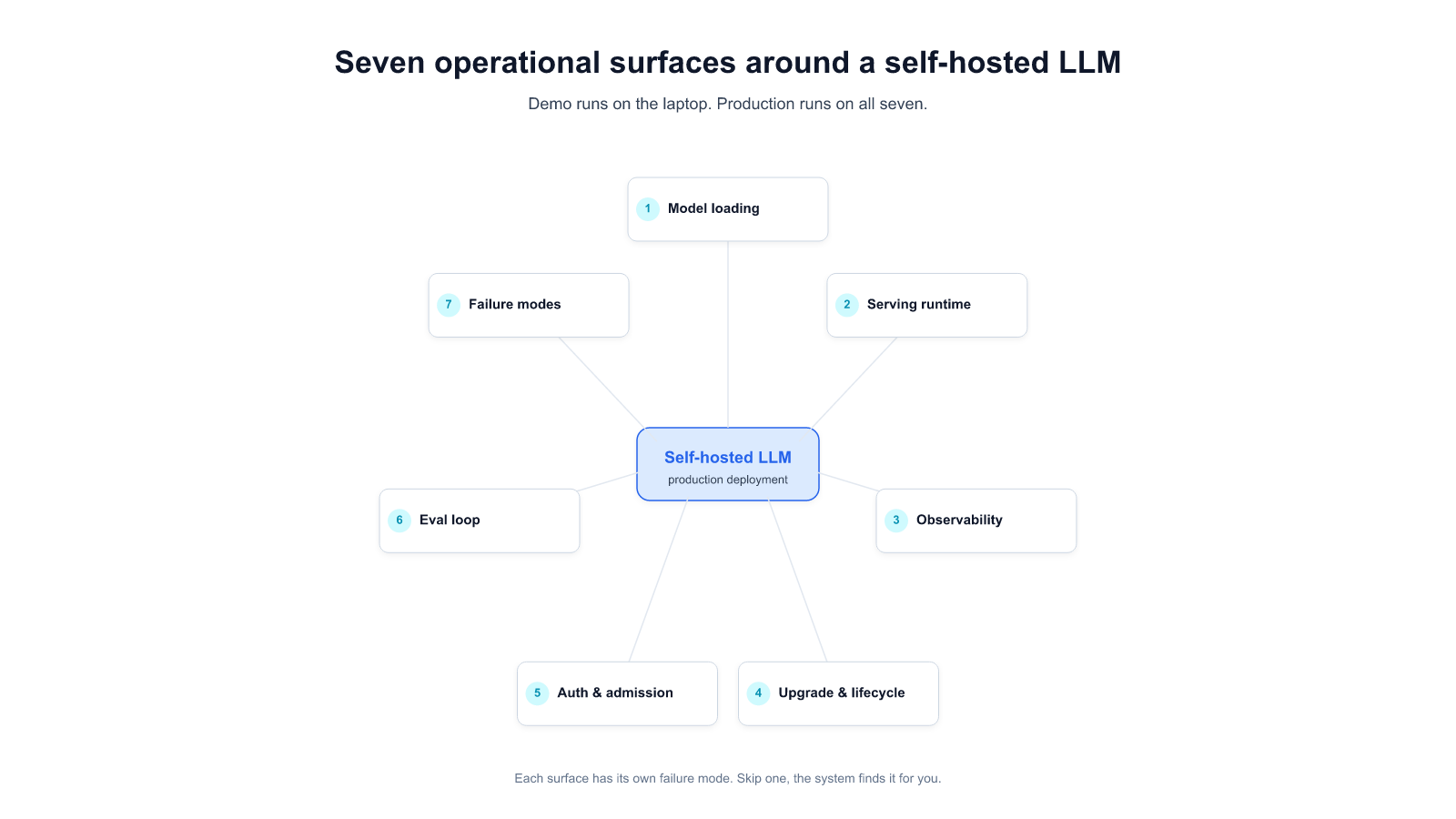
A production on-prem LLM is not a single service. It's seven operational surfaces that each have their own monitoring posture, failure modes, and ownership question. This section summarizes them; [[034 — Self-Hosted LLM: The Operator's Checklist for Enterprise Production]] covers each with minimum-viable bars, most-seen failure modes, and a done-check question.
For the buyer reading this guide: the point of this section is to put a number on what your team is taking on. For the platform team they'll hand this guide to: the checklist in [[034]] is the operational reference they'll want bookmarked.
1. Model loading. Weights arrive, are version-pinned, stay locally cached, and resume cleanly when a pull fails. A 140 GB weight artifact is a different operational shape than a 200 MB container image — the registry needs to be sized for it.
2. Serving runtime. vLLM, TGI, Triton, SGLang, or a specialized alternative. The runtime choice gets too much attention in community discussions; the real production risk is config drift across hardware generations, not which runtime is picked (see [[023]] Incident 1 for what that looks like in production).
3. Observability. Token-level metrics (throughput, time-to-first-token, tail latency), queue-level (depth, rejection), resource-level (GPU SM utilization, memory bandwidth, KV-cache pressure), and sampled request-level structured logs. Wired on day one, not week three.
4. Upgrade and lifecycle. Canary deployment path with automatic rollback on latency or quality regression; a per-release eval gate; weight-and-runtime version pinning; a rollback runbook with a time budget. Without these, every upgrade is a multi-week project.
5. Auth, identity, admission control. Corporate SSO in front of the inference API; per-user or per-team quotas; prompt-length, output-length, and tool-call chain-depth admission controls; audit logging with retention matched to sector regulation. The static-API-key approach does not survive a security audit.
6. Eval loop. A task-specific eval dataset (50-500 real queries — not HumanEval, not MMLU) that runs on every weight change, every runtime change, and every retrieval-corpus update. Regressions surface as dashboard deltas, not as user complaints. This surface is where enterprise teams most often underinvest, and where the ROI is only visible when a regression doesn't ship.
7. Failure modes and runbooks. Written runbooks for GPU OOM under new workload shapes, silent kernel miscompile after driver upgrade, prompt injection on the tool-use surface, parser or tokenizer drift, and silent runtime crashes. Each runbook short, each owned by a named team, each triggered by alertable conditions rather than user complaint.
Staffing implication. Running these seven surfaces at production-grade requires roughly 1.5-2 full-time engineers for a single-cluster deployment, dropping to ~0.75-1 per cluster once the second cluster exists (amortization of the tooling). Most RFPs size "operations" at one-quarter to one-half of this. The shortfall shows up in the first six months as incident-response time.
Practical implication for the vendor evaluation. A vendor who has built for on-prem at enterprise scale will have a written answer for each of the seven surfaces — not a product feature per surface, but a defined division of responsibility between what the vendor provides and what the customer's team owns. A vendor who hedges on §5 items or collapses them into "managed" without specifying which layers is not optimized for this buyer segment yet. (§6 below covers the vendor-evaluation question set in detail.)
6. Vendor evaluation: 15 questions that matter
Procurement-ready questions. They're not marketing questions; they're operational questions. Ambiguous answers are signals. Organized by topic. Every vendor in the shortlist should be able to answer all 15 concretely in writing within a week.
Refresh cadence and lifecycle (Q1-Q4)
Q1. When a new frontier model ships, what is your delivery path to our cluster — cadence and mechanism? Honest answer has both. Cadence: weekly / monthly / quarterly / ad-hoc. Mechanism: signed package over WAN / physical media for air-gap / mirror release. Hedge = bad sign.
Q2. For the model families we care about (name them), what is your upgrade regression record over the last 12 months? Pre-and-post-upgrade benchmarks on customer workloads. Count of customer-visible quality regressions. A vendor who hasn't tracked this hasn't operated at enterprise scale yet.
Q3. Who is responsible for retuning when we move hardware generations (H100 → H200 → B200)? See [[023]] Incident 1. Answer "we provide a reference config" is not the same as "we own the retune." Know which you're buying.
Q4. What is your rollback protocol when an upgrade regresses quality on our workload? Time-to-rollback in hours. Who triggers it. Whether our eval suite gates promotion.
Privacy and boundary (Q5-Q8)
Q5. Where does embedding happen for documents we ingest? Our infrastructure, or a vendor-managed service? If vendor-managed, what jurisdiction? Embeddings are inversion-susceptible; treat the embedding endpoint as a sensitive-data crossing. (See [[032]] Layer 3.)
Q6. Where does the vector database sit? Customer's cluster or vendor's cloud? For regulated corpora, the vector DB is in audit scope — the vendor's hosted service usually isn't.
Q7. What logs do you retain on retrieval results, for how long, who on your side reads them, and under what access-control audit trail? If the answer is hedged, the logs exist and nobody has said so clearly.
Q8. Does our retrieval data or query data feed any model training — yours or a subcontractor's — under any consent model? "No, fully isolated" is the clean answer. Any other answer needs follow-up.
Operational responsibility split (Q9-Q11)
Q9. For each of the seven operational surfaces (§5 above), who owns it — us, you, or jointly? A vendor who can't answer this explicitly hasn't built for on-prem at enterprise scale. A vendor who can answer "joint" for surfaces where they provide tooling and we operate has built for it.
Q10. What happens if we need a custom serving-runtime config for our hardware class, and the next vendor release breaks that config? Is our config preserved, overlaid, or clobbered? Where's the source of truth?
Q11. What's your runbook catalog for LLM-specific incidents? Prompt injection on tool-use surface, silent kernel miscompile, parser/tokenizer drift, large-model upload failures. A vendor who doesn't have runbooks for at least the OWASP LLM Top 10 categories hasn't had production incidents yet.
Support, SLAs, and compliance (Q12-Q15)
Q12. What's your SLA for quality regressions vs uptime regressions? Most vendors have uptime SLAs; few have quality SLAs. If a model refresh drops our task accuracy by 5 %, what's the committed response time?
Q13. What compliance frameworks have you delivered under before (HIPAA BAA, SOC 2 Type II for on-prem tooling, CSAP, FSC, AISI, GDPR SCCs)? Specific deliverables, not generalities. "Yes, we support HIPAA" ≠ "Here are the BAAs we've signed and the on-prem configurations we've delivered."
Q14. What's your audit-support process? When our auditor asks for logs, architecture documentation, access records — what's the turnaround, what's the handoff, and what's the sustained rate before audit-support hours become billable?
Q15. What's the exit runbook? If we give 90 days' notice and terminate, what's the step-by-step for: source-of-truth export of our corpus, deletion verification on vendor side, transfer of eval dataset, transition of runbooks. And what residual data / knowledge / dependencies exist after that's complete?
How to read the answers. Vendors optimized for this buyer segment have written answers. Vendors bolting on enterprise posture will answer some concretely and others with "depends on your configuration" without saying which configurations are on offer. The fastest signal is Q9 — a vendor who cannot draw the operational-responsibility split has not thought about the enterprise shape of their product.
7. Deployment patterns: air-gap, BYOC, hybrid-with-boundary
On-prem is not a single architecture. It's a spectrum with three common packaging points. Most enterprises can match their workload mix to a pattern, and a well-designed deployment uses more than one — air-gap for the most-regulated workloads, hybrid for the rest, never forcing every use case to the most restrictive tier.
Pattern A — Fully on-prem / air-gap
What it is. All ten reference-architecture components (§3) sit inside the customer's boundary. The cluster has no path to the internet. Model refreshes arrive via physical media or signed-package delivery through an approved gateway. Every upgrade is a scheduled operational event.
Satisfies. All three privacy layers (§2) by architecture. No egress means no ingress-layer ambiguity, no operational pattern leakage, no retrieval-layer vendor touch.
Right fit for. Classified-data environments, national security contexts, some defense contracting, some public-sector (CSAP-gated) workloads, specific financial-sector regulations that forbid egress. Any scenario where the auditor evaluates architecture rather than outcome and requires a physically-isolated network segment.
TCO profile. Highest capex (self-owned hardware + physical delivery mechanism). Highest recurring ops (every upgrade is a scheduled event, including the air-gap-safe update tooling). Lowest per-request marginal cost once the cluster is deployed. 3-year TCO typically 2.5-3.5× the vendor's upfront-only quote once Group 2+3 (§4) are priced in.
Operational implication. 1.5-2 FTE per cluster minimum. Model refreshes become a project with a defined pipeline (receive → stage → qualify → canary → promote) that typically spans 2-4 weeks per refresh.
Pattern B — BYOC (bring-your-own-cloud, single-tenant hosted)
What it is. The vendor's control plane lives in its cloud. The data-plane inference runs on a cluster inside the customer's AWS or GCP or Azure account. Traffic stays within the customer's VPC. Operators from the vendor do not have console access to the data plane. Control plane (auth, billing, model versioning, telemetry) calls home over a documented, auditable channel.
Satisfies. Layer 1 by architecture. Layer 2 partially — control-plane telemetry usually needs careful configuration to block operational-pattern leakage (§2 Layer 2 discussion). Layer 3 partially — the embedding model and vector DB can run inside the customer's VPC, but the default vendor topology often hosts one or both; explicit engineering required.
Right fit for. Customers who want "private data, but not running GPUs in our own datacenter" — a common preference in financial-services firms who are cloud-native on other systems. Also: customers who want faster upgrade cadence than air-gap allows.
TCO profile. Lower capex than Pattern A (cloud-hosted GPU as opex). Lower recurring ops (vendor handles more of the lifecycle from the control plane). Trade-off: cloud GPU cost can exceed owned-hardware amortization for steady-state high-utilization workloads. 3-year TCO typically 1.4-2.2× the vendor's upfront quote (narrower gap than Pattern A because subscription includes more of Group 2+3).
Operational implication. 0.75-1.25 FTE per cluster. Vendor owns more of the runbook surface; customer owns auth, eval, and policy.
Pattern C — Hybrid with audited boundary
What it is. Mixed architecture. Some workloads (those hitting the strictest compliance bar) run in Pattern A; the rest run via Pattern B or even encrypted-SaaS with BAA. A router in front of the inference API decides which workload goes where based on data-sensitivity classification, user group, or explicit routing rule. The audit artifact is the boundary definition — which queries, from which users, with which document classes, route where.
Satisfies. Depends entirely on routing. The audit task becomes verifying that the routing policy correctly classifies every request. Most enterprises underestimate how hard this is, and overestimate how often the strictest tier is actually required.
Right fit for. Most regulated enterprises, once they look at their actual workload distribution. A bank might have 5% of queries hitting MNPI-adjacent data (air-gap required) and 95% hitting general operational data (BYOC or encrypted SaaS sufficient). A Pattern C deployment sizes the air-gap cluster for the 5%, not the 100%, and realizes the cost gap.
TCO profile. The weighted sum of Pattern A (for the strict-tier workload) and Pattern B (for the rest). Almost always lower than Pattern A at scale because most enterprises do not have a majority of workload at the strictest tier. 3-year TCO typically 1.2-1.8× the vendor's quote.
Operational implication. Higher integration work upfront (classifier, router, audit logging), lower ongoing ops because only the air-gap subset requires the operational rigor of Pattern A.
How to pick
Match patterns to workloads, not to the organization. The audit question is almost never "which pattern are you on" — it's "for this specific class of data, under what policy, where does the inference happen." A vendor who understands this and can deliver mixed-pattern deployments with coherent audit logging is the right partner for most regulated enterprises. A vendor who only sells one pattern is selling a limitation.
The most common mis-pattern we see: a regulated enterprise adopts Pattern A across 100% of workload because the 5% most-regulated workload required it, and the capacity sizing, ongoing operational cost, and slower upgrade cadence become organizational drag for the 95% that did not. A Pattern C deployment (designed from day one or migrated to within 12 months) resolves this.
8. The first 90 days in production
A realistic deployment timeline, calibrated against the 19 enterprise deployments we've tracked. Teams that short-circuit a phase almost always spend the skipped time later as incident-response overhead. Teams that run all six phases in sequence — even quickly — come out of the first 90 days with a platform that absorbs subsequent upgrades without drama.
Weeks 1-2 — Kickoff and requirements lock. - Sign the compliance-requirement translation from §2: which layer does your auditor actually require? - Pick the deployment pattern (§7). Lock this before hardware ordering. - Lock the eval dataset (§5 surface 6): 50-500 real queries, rubric per task category. This is the regression gate you'll apply to every subsequent change. - Name the platform team, define the on-call rotation, identify the escalation path.
Weeks 3-4 — Infrastructure foundation. - Provision hardware (or cloud account for BYOC), network, storage, power. - Stand up the local model registry; test weight upload/download at full artifact size. - Establish the delivery mechanism for model refreshes (physical media pipeline for air-gap, signed-package path for BYOC).
Weeks 5-6 — Core system install. - Deploy the serving runtime on the first hardware class; tune the four knobs (tensor parallel, GPU memory utilization, max-num-seqs, KV-cache dtype) against your reference workload. Check the config into source control. - Stand up the retrieval stack: embedding service inside the boundary, vector database sized for corpus volume × multi-representation headroom, reranker if in scope. - Wire the observability stack: token / queue / resource / request-level metrics. Both dashboards (cluster-health and incident-timeline) operational from day one.
Weeks 7-8 — Corpus, eval, first load test. - Ingest the initial document corpus through the ETL pipeline. Validate chunking, metadata extraction, content-type coverage. - Run the eval dataset against the deployed system. Record baseline. This is what every future upgrade compares against. - Load test at 2× expected peak concurrent users. Fix whatever breaks.
Weeks 9-10 — Security review + canary. - Security team review: auth, quotas, audit logging, incident response runbooks. Fix gaps before the canary. - Identity integration: OIDC/SAML into the inference gateway, per-user identity propagation into inference logs. - Deploy to canary user set (5 %, then 25 %); validate eval metrics in production conditions.
Weeks 11-12 — Full production launch + first-incident readiness. - Expand to full user base on a scheduled cadence (50 % → 100 % with 48-hour observation windows between). - Run a tabletop exercise for the five LLM-specific runbooks from [[034]] Surface 7. This is before you have a real incident, not after. - Establish the weekly failure-case review cadence on eval outputs. This is the habit that catches regressions in months 2-12.
What this does not include. The first production model refresh — which lands sometime in month 4-6 after launch — is a separate exercise. The playbook above is about getting the platform to a state where refreshes become an operational event instead of a project. [[023]] covers what the refresh cost looks like when the platform is in that state vs when it isn't.
9. Reading list and further references
Our supporting posts (pillar-to-supporting link mesh)
- [[023 — The Hidden Cost of Air-Gap AI: Who Pays When the Model Ages]] — buyer-audience narrative of the recurring-cost asymmetry, with the three incidents (B200 regression, parser drift, large-model registry) as evidence.
- [[027 — Air-gap real incidents]] — engineer-audience technical companion to [[023]], same incidents, deeper on the systems side.
- [[032 — Private AI Assistant: What "Private" Actually Means When You're Regulated]] — the three-layer privacy framing, per-layer architecture, decision framework, and 8-question procurement-ready vendor checklist.
- [[034 — Self-Hosted LLM: The Operator's Checklist for Enterprise Production]] — engineer-level depth on the seven operational surfaces, with minimum-viable bars and done-check questions.
- [[022 — Site instrumentation urgent]] — the measurement layer for our own blog (meta-reference).
- (Coming: W18 post on air-gap-vs-cloud buyer decision, W24 post on HIPAA-aligned air-gap path, W25 pillar C on compliance-gated deployments.)
External standards and specs
- NIST AI RMF: https://www.nist.gov/itl/ai-risk-management-framework
- ISO/IEC 42001 AI management system: https://www.iso.org/standard/81230.html
- OWASP LLM Top 10: https://genai.owasp.org/llm-top-10/
- EU AI Act: https://artificialintelligenceact.eu/
- HIPAA Security Rule (45 CFR Part 164 Subpart C): https://www.hhs.gov/hipaa/for-professionals/security/
- PCI DSS 4.0: https://www.pcisecuritystandards.org/
- vLLM docs: https://docs.vllm.ai/
- SGLang docs: https://sglang.readthedocs.io/
- Embedding inversion attack literature (for Layer 3 risk framing): see recent NeurIPS / USENIX Security proceedings.
Public policy and regulator guidance we track
- Japan AISI draft guidance for regulated sectors.
- Korean CSAP evaluation criteria for AI systems.
- Singapore MAS AI governance guidelines for financial institutions.
- Financial regulators in EU, UK, US on sector-specific AI deployment.
The one-paragraph version, for the exec who skipped to the bottom
On-prem LLM deployment is a recurring lifecycle cost, not a one-time project. Three privacy layers (ingress / operation / retrieval) each map to different compliance scenarios; most enterprises genuinely need only Layer 1 or 2, and end up paying for Layer 3 because their RFP didn't specify clearly. Ten components make up the reference architecture; the seven operational surfaces around them determine your platform team's recurring cost. TCO is typically 1.8-3.5× the vendor's quoted number once you include the recurring cost. A well-designed deployment uses Pattern C (hybrid with audited boundary) for most workloads and reserves air-gap for the specific tier that actually requires it. The first 90 days get you to a state where subsequent model refreshes are operational events, not projects.
If that paragraph matches the situation you're in, we're happy to walk through specifics with your team.
If your enterprise is evaluating on-prem LLM deployment for a specific regulated workload, and you want to pressure-test your approach against this guide — or work through the parts that are not obvious — we do these conversations.
Start a conversation — share your compliance posture, hardware plan, and timeline. We'll come back with specifics on which of the seven operational surfaces we think will be the biggest friction for your team.
Start a 14-day trial — run Alli Coworker on your own hardware (or a representative staging cluster) before you commit.